


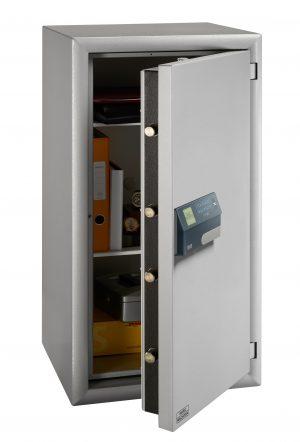
You're standing in front of your safe at 6:45 a.m., coffee in one hand, trying to remember whether your combination ends in 34 or 43. Meanwhile, your teenager walks by, presses a thumb to a small sensor, and is in and out in under two seconds. That small moment sums up why fingerprint safes have gone from novelty to mainstream option in just a few years — but it also raises a fair question: is faster and easier actually better when it comes to protecting your valuables?
This article breaks down what fingerprint technology actually is, how it stacks up on security, speed, and everyday usability, and where it still falls short — so you can decide if it fits how you actually live.
Understanding Fingerprint Technology
Fingerprint recognition is a form of biometric authentication — it verifies identity using a physical trait unique to you, rather than something you know (a code) or something you carry (a key). When you register your fingerprint with a safe, the sensor doesn't store an image of your print. Instead, it maps distinctive points in the ridge pattern — where lines split, end, or curve — and converts that into an encrypted mathematical template. Every time you place your finger on the sensor afterward, it takes a fresh reading and checks it against that stored template for a match.
Most consumer safes use one of two sensor types:
- Optical sensors, which essentially take a detailed picture of the fingerprint's surface pattern.
- Capacitive sensors, which measure tiny electrical differences between the ridges and valleys of your skin, producing a more detailed and harder-to-fool reading.
Capacitive sensors are generally considered the stronger option and are increasingly common as the technology has matured.
Weighing the Security: Strengths and Real Limitations
The case for fingerprint security is straightforward: you can't forget your fingerprint, and unlike a four-digit code, it isn't easily guessed, shared, or written on a sticky note. Because no two fingerprints are identical, and because the safe stores an encrypted template rather than a plain image, a stolen safe generally can't be opened just by figuring out "the code" the way a combination lock can.
The honest caveats are worth naming too. No security method is invulnerable, and fingerprint sensors are no exception:
- Cheaper optical sensors have, in testing by security researchers, occasionally been fooled by high-quality fake fingerprints (think a mold made from a lifted print). Capacitive sensors are meaningfully harder to spoof this way.
- Fingerprint safes almost always include a backup key or PIN code, which is smart for accessibility — but it also means the safe's security is only as strong as its weakest entry method.
- Battery-powered sensors can fail; a good safe accounts for this with a manual key override, but that's a mechanical lock at that point, with its own set of considerations.
The reasonable takeaway: a mid-to-high-quality fingerprint safe with a capacitive sensor is generally a strong upgrade over a basic combination lock, but "fingerprint" alone isn't a magic word — the underlying build quality and backup access methods matter just as much.
Speed: How Fast Is Fast?
This is where fingerprint technology has a clear, measurable edge. Most modern sensors authenticate in well under a second — often around 0.3 to 0.5 seconds — compared to the several seconds it typically takes to dial a mechanical combination or type a multi-digit PIN correctly (especially in the dark, or under stress).
For context, consider the scenarios where speed actually matters:
- A homeowner reaching for a firearm safe in an emergency.
- A retail employee who needs to access a cash drawer safe dozens of times per shift.
- A parent juggling groceries and a toddler who just wants the jewelry safe open now.
In each case, shaving even three or four seconds off access time adds up — either in cumulative daily convenience or, in higher-stakes situations, in ways that genuinely matter. That said, speed shouldn't be the only deciding factor; a safe that opens quickly for you should also be reasonably difficult for anyone else to open quickly.
Simplicity in Everyday Use
Beyond raw speed, the bigger everyday win is cognitive load — or the lack of it. You don't need to remember a code, and you can't misplace a fingerprint the way you might misplace a key. Multi-person households and small businesses often appreciate that most fingerprint safes support several stored prints (commonly 10–20), so each family member or employee gets individual access without sharing a single code with everyone.
This simplicity is genuinely appealing for:
- People who tend to forget PINs or reset them often.
- Households where multiple people need independent access.
- Anyone who values a "just walk up and open it" experience over a multi-step process.
Where it's less of a slam dunk: fingerprint sensors can occasionally struggle with wet, dirty, injured, or unusually dry fingers — a wrinkle worth knowing about if you or a household member works with your hands. Most safes address this with a backup PIN or key for exactly these situations.
So, Is a Fingerprint Safe Right for You?
There's no universal answer, but a few questions can help you decide:
- Do you value speed and convenience highly, and are multiple household members likely to use the safe? Fingerprint technology tends to shine here.
- Is your top priority maximum security regardless of cost, and are you comfortable with the added complexity of biometric systems? Look specifically for capacitive sensors and reputable brands with strong backup-access designs.
- Do you or someone in your household have fingerprints that are frequently affected by manual labor, skin conditions, or injury? A safe with a reliable backup PIN or key becomes especially important — or a traditional lock might suit you better.
Fingerprint safes aren't a flawless upgrade over every other option, but for most everyday users, they offer a compelling combination of speed and simplicity, backed by security that's generally on par with — or better than — traditional locks, provided you choose a well-built model. As with any security purchase, it pays to look past the "fingerprint" label itself and check the sensor type, backup access options, and build quality before you buy.

 Arabic
 French
 Spanish
 Portuguese
 Deutsch
 Turkish
 Dutch
Dutch
 Italiano
 Russian
 Romaian
 Portuguese (Brazil)
 Greek
Greek